MagSafe

I was a bit underwhelmed when I first started experimenting with my new iPhone 17. Coming from an old SE, I had expected the jump to the 17 to be a major change for the better. What I noticed instead were lots of relatively small improvements and a few big ones. Everything worked just a little bit better, a little smoother, and it made me realise my old phone wasn’t even that old. A noticeable upgrade was the larger, better screen, and the biggest change was the battery. I can now use my phone all day without worries.

There was one more big improvement that I didn’t notice at first: MagSafe. After getting a MagSafe charger for my nightstand, it didn’t take long to adjust to the new level of comfort it offered. There was a small issue with the bright LED built into the charger, but a small sticker quickly solved that. Step two was a MagSafe charger for my car, and that was all I needed to stop using cables altogether. It’s a very satisfying reality where I simply drop my phone onto the magnet or pull it off again. Sure, it might take a bit longer to charge, but since my phone is now my alarm/clock and it charges while I sleep, I don’t care.

My old phone used to turn itself off at least a couple of times a year from overheating. That’s what you get for living on a tropical island, I guess. The new phone has a cool feature to avoid overheating: a vapor chamber that should distribute heat more evenly so the phone can cool down faster. The really warm and sunny days are still a few months away, so this feature is something I’ll put to the test in the future.

For now, my conclusion is simple. My new phone wasn’t the jump into the future that I expected, but it has enough improvements to make me happy. The new magsafe (new for me, it been available for a few years already) did make me experience a jump into the future, and makes me happy.

Indie developer

Indie developer!Ofcourse I have heard about ‘indie developers’. I like these kinds of games a lot, but suddenly I realised something…

No publisher, no external boss, no committee telling me what the game should look like. I decide the mechanics, the art style, the branding, the emotional tone and that creative autonomy is the core of being indie. My projects come from nostalgia, curiosity, and joy, not market pressure. That’s classic indie energy: making something because it matters.

Well, that also applies to mushroom mayhem… it just hit me: I am an indie game developer. Good times!

Mushroom Mayhem

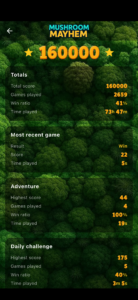
Mushroom Mayhem!Mushroom Mayhem is a puzzle game set in a mysterious woodland filled with hidden mushrooms. Each tap uncovers a piece of the forest, reveals subtle clues, and challenges you to deduce where the magical fungi are hiding. Trust your intuition, read the signals of the woods, and unravel the pattern before the mayhem begins. A cozy blend of strategy, nature, and a touch of chaos.

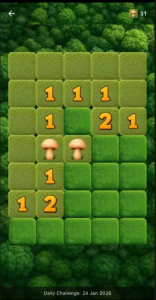
Gameplay is easy, intuitive and challanging. Tap to reveal the tile. Tap and hold to mark as dangerous. The numbers show how many mushrooms are around that tile. Calculate possibilities, play it safe or take some risks. Like life itself, it is up to you.

Get Mushroom Mayhem!

Day three

In the first two days I got a lot of work done. Today in Spain we celebrated the three kings day, so I had another day available. The third day gave me some time for testing, tweaking and finetuning. I tried the app to find stuff that didn’t feel right, logic that did not work as I expected, and other small issues. I changed some images, modified some gameplay, and used the AI to improve what I already had. Three days (and a clear idea of what I wanted) was all I needed to go from a five year old concept app to a good looking game that gave me a really good feeling. Color me amazed!

Weekend with the AI

I had one weekend without the kids, so I suddenly had some extra time. I decided to invest it in a game I started building five years ago but never finished. I used Copilot AI, which is very nicely integrated with Visual Studio Code.

First two hours
The first few hours I could use the AI for free, just to get a taste. And did I get a taste. My old app was extensively modified so it would run again in a modern environment. Work that would have taken me days was done effortlessly by Copilot in a very short time. All the files that made up the project were updated, and every change was clearly explained. I was left amazed.

First full day
After a few hours, my free time with the AI ran out and I got a monthly subscription to continue. The level of cooperation the AI provided felt genuinely valuable. It was like talking to a colleague who had been working on the same project with me. I used the AI to review and correct code, configure my development system properly, and connect my iPhone for testing. The AI quickly understood requirements and implemented them just as I would have done myself. It adapted to my style. Impressive.

Second day
Yesterday I used the AI for small functionality changes. Today I took it a step further. The AI created the entire adventure mode, first 5 levels, and later expanded it to 25. It implemented the background music and helped me fine-tune the settings page. The AI helped me update all the graphics. The amount of work completed would have taken me weeks on my own.

The app I created was small and quite simple, but the AI’s contributions left me speechless. Copilot boosted my productivity enormously. I felt like a tester whose feedback was fixed immediately by the AI. Incredibly satisfying. Dreaded errors in project dependencies or startup issues no longer caused stress, the AI simply fixed every error that appeared and got the app running.

A few more tweaks are required and then I will place the app in the appstore. To be continued!…

Vintage

Vintage! Vintage, a beautiful word. For some it means old, for others valuable or beautiful. For me it means used and beloved. Usually it takes a while before an object becomes vintage, but I now have a phone case that has aged at lightning speed.

It’s a high-quality green tech woven case for my iPhone 17 Pro. Not the official version, but a pre-release sample where the sides aren’t made of plastic, but also of tech woven material. The result is a case whose color has almost completely worn off in the spots most often touched. In just two months, the case has aged so much that it looks as if I inherited it from my grandfather.

Some people might think it looks rather sad, but I’m absolutely delighted. I find it fantastic to have such an antique-looking case around my ultra-modern phone. Still, I’ll have to see if it holds up for a few more months. For now it has lost some color in certain areas, but structurally it remains a great case.

Qi2

Step one was a new phone. I was happy with it, but something was missing. Step two was a new charger. Finally, I can forget the hassle with cables, because now I just need to click two magnets together and that’s it. My new charger is truly a dream come true. No more cables slowly breaking, no more fiddling to clean my phone’s charging port.

I now have two options:
Charging: I place the phone on the charger, and half an hour later it’s ready.
Charging and clock: I unfold the charger, stick the phone on it, and in half an hour it’s charged plus I have a subtle little clock next to my bed all evening.

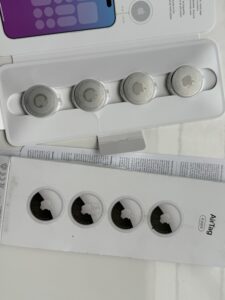
My charger is a Ugreen Qi2. Nice and sturdy, and a bit heavy too, but that actually feels good when you snap the phone onto it. Folded up, it’s a small cube you can charge your phone on. You can also unfold it, and then you have two charging spots: one for your AirPods, and one for your phone, which then doubles as a clock. My phone charges enough in half an hour to easily last the whole day.

There’s only one small downside: for some reason, the charger has a bright white LED to show it’s working. It’s a tiny light, but just annoying enough and of course, you can’t turn it off, so I just stuck a little sticker over it.

Pro17 – Review

My old phone started showing some issues after five years. The battery was getting worse by the day. The charging cable no longer fit properly, and I had to patiently insert it the right way or otherwise, I’d end up with a dead phone. The memory was full, and I could only install new updates after clearing out all my photos. I definitely wasn’t having an optimal user experience, so it was time for an upgrade.

After some thought I decided to go for the top of the line, and I got myself a crisp new iPhone 17 Pro! I have been using my new phone for about a week, and I am quite happy with it. Here are the key highlights.

The positive points:

  • One hand: I can still operate it with one hand. Some corners are a bit hard to reach, but I can do it. The missing button, compared to my previous phone, is not really a problem.
  • Speed and battery life: The phone is really fast, and it works a long long time with its battery
  • Design: It looks pretty good, I’m happy with the phone’s aesthetics, and inside its cover it doesn’t tip over when it is lying on my desk and I click the screen.
  • Screen: A bit bigger so that is good, although I really did not mind the smaller screen and the button that I used to have.
  • At night: Pictures really capture a nighttime image as it looks to me, with all the light sources and details. The phone knows when you are making a shot at night, and it tells you to hold the phone still a couple of seconds. My old phone simply shot a black image, where you would see nothing, which was always quite disappointing.
  • Favorite new thing: I love the dual mode video option, where you get a video with the both the front and back camera. Great for small youtube clips.

What I did not like:

  • Overly flashy: The interface might look good, but for me it did not work. I turned off most animations and turned off the always-on option, which I was looking forward to, but eventually just ended up frustrating me because it seemed like the phone would not turn off.
  • Hiccups: Sometimes things are not working right away (or I am doing it wrong). They were not intuitive enough, and that is exactly what iOS should be. I had problems turning on the flashlight and turning on the camera, both buttons available on the very first screen, and this should be simple, but frustatingly I did not get it to work every time I wanted to.
  • Redoing old stuff: I had to re-add all my bank cards to my wallet, and re-authorize all my bank apps. Probably to make sure it was still really me, but it was a bit troublesome because I needed passwords I had not used in five years. Another pain was that all my time based authenticators stopped working and had to be recreated.
  • Imperfect fit: I normally carry my phone in my pant pocket

Overall I’m happy. I feel like for the next couple of years I will have a good phone. It’s really very fast, but I doubt I really need this speed. My old phone was clearly slower, but it was enough for me. The best point is the new battery, I went for charging my phone three times a day to a phone that just keeps working for two days, and a quick charge is enough to keep it working for a day more. I did have to turn off all the fancy graphical effects, and turn on low-power mode, but that gave me exactly what I wanted. A phone I can use when I need it.

17 Pro

17pro!I started with my brother’s old iPhone 4 (2013), then switched to my first budget version, the SE (2016). After that, a slightly newer budget version, an SE from 2020. Now, five years later, the battery drains much faster. I can barely get a few hours out of it, especially when using navigation. Time for an upgrade, and I’ve thought about it for a long time, but I’m going for it. I’m moving from the budget model to the top of the line.

During the presentation of the new iPhone 17 Pro, a few things immediately caught my attention. First of all, it’s not available in black. Strange, and a pity, because that would have been my preference. Now I’ll go for white, hoping it has the advantage of heating up less quickly in the sun. I also noticed that a square sensor is now used for photography. The benefit is that it doesn’t matter how you hold the device, vertically or horizontally, for photos. Well, it sounded like part of the image is always unavailable now. The camera lenses stick out, so I can’t lay the phone flat on my desk… also a shame. And finally, unsurprisingly, the device is terribly expensive.

Do I really need it? No, of course not. Is it a waste of money? Probably. It is nice to have something good. This phone it for now the best there is, or really close. Lets see if I adapt as well to this change, as my speedy adaptation to my first smartphone years ago.

ezDatepad: Simplicity meets boundless potential

ezDatepad!ezDatepad is a text editor combined with a calendar — simple yet powerful. Finally there is an easy and intuitive tool to keep data related to dates or times. The data you store, whether related to the present, past, or future, aids in memory, planning, and evaluating your thoughts and actions.

Use ezDatepad as an ideal planning tool, a diary, an agenda, a journal or a way to assess your past or shape your future. It’s also perfect for small tasks like creating shopping lists, quickly jotting down phone numbers, names, notes, ideas or whatever comes to mind.

Get ezDatepad!