
I love my iPhone, but there is one thing I genuinely despise: using navigation in my car.
Picture this: I’m driving, unsure of the route. I unlock the phone, launch the navigation app, and snap it onto the magnetic mount. Then I select Bluetooth on the car stereo so I can hear turn-by-turn directions. Instantly, music starts blasting through the speakers. There’s no straightforward way to kill it, and no clean way to avoid it.
To fix it while driving I have to park the car. Then I have to pull the phone off the charger, swipe away from navigation, pull down Control Center, pause the music, switch back to maps, and snap it back onto the mount. Touch anything remotely related to audio on the car console afterward, and the whole circus starts over. It’s infuriating.
I finally found a workaround, but it’s an absurd chain of Automations, Shortcuts, and a dummy audio file:
- Download a 10-minute track of pure silence.
- Sync the audio file to the Apple Music library via Mac or PC.
- To avoid playing the silence track while you listen to your music, in your desktop library, locate the silence track, right-click it, and choose Get Info. Switch to the Options tab, check the box for ‘Skip when shuffling’, and click OK.
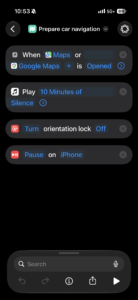 Set an iOS Automation triggered whenever the phone connects to the car’s Bluetooth.
- Create a Personal Automation in the iOS Shortcuts app to run when Maps opens:
- Trigger: When Maps is opened (set to Run Immediately)
- Action 1: Play [Silence Track] (Music)
- Action 2: Pause media on iPhone
Thats it: Now, when you connect your car’s Bluetooth to the iPhone, the silent track will queue up instead of your music. Even if the stereo forces playback to start again, you’ll hear nothing but navigation instructions from then on.